
The Far Carry
How to play
The controls, the screens, the scoring, the modes, and how to look after your save.
Part one covers playing a hole. Part two covers a run: modes, scoring, the shop, the golfers and the caddies. Part three is settings, saves, installing it as an app, and what to do if something goes wrong.
Part one — playing a hole
01 The short version
You are a golfer with a spaceship. Each stop is a hole or a set of holes on a procedurally-generated course somewhere in the galaxy. Play it, score well enough to survive, spend what you earned, fly on to the next world.
Press the map and drag down to load power, sideways to aim, release to swing. Or just tap the green 🏌 Swing button for a full swing on the assisted line.
On the green, read the break, then stop the pace meter where you want the weight.
Each stop has a score you have to make. Miss it and the tour drops you.
Buy clubs and gear with credits, fuel the ship, choose a route, do it again — harder.
In a hurry? The » button on the play screen auto-finishes the hole for you at any point, with the same golfer, bag and caddy you would have played it with.
02 Your first swing
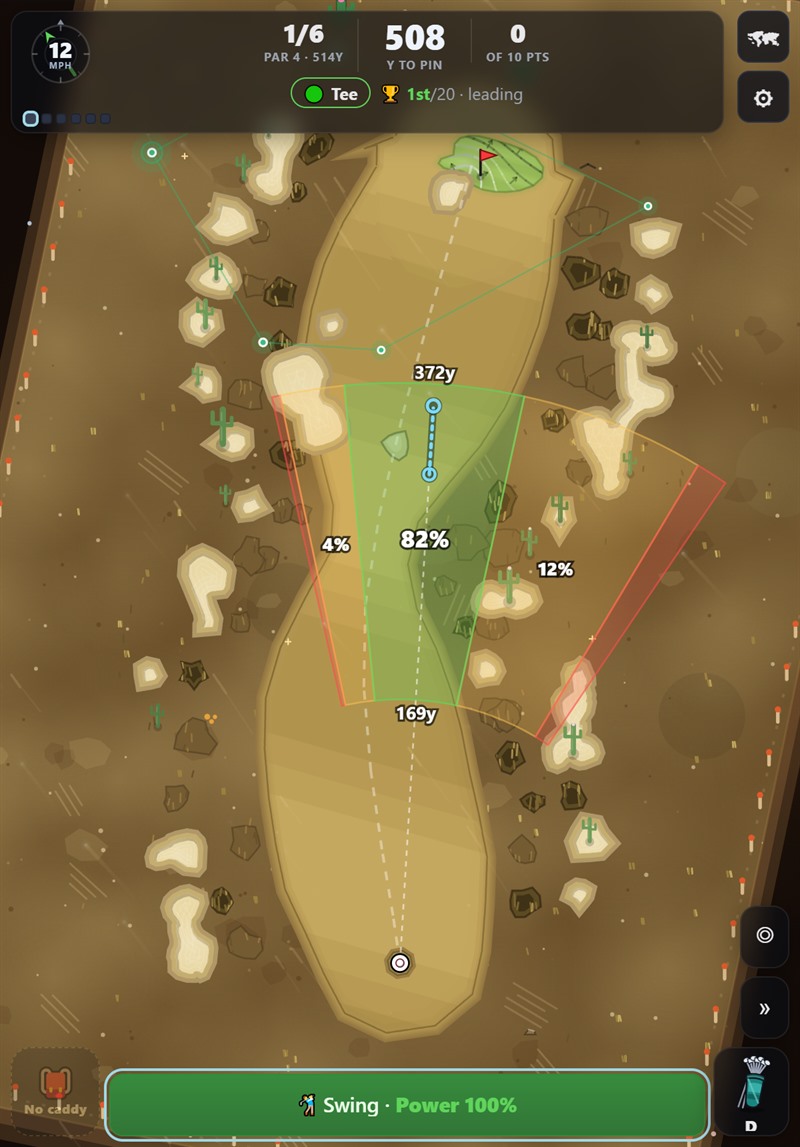
The whole shot is one gesture. Press anywhere on the map and drag downward: the spray cone grows out of the ball as the power loads, from a soft tap toward a full swing. Slide sideways while you hold to swing the aim left or right. Release to fire.
Release with the power back near zero — a plain tap, or a charge you pulled back up — and nothing happens. A stray touch can never cost you a stroke.
If you would rather not do any of that, the button at the bottom does it for you. It rests at a full swing and reads 🏌 Swing · Power 100%; while you are charging it changes to ⚡ Release and shows the live number.
The cone is the spread the game will roll your shot against, drawn to scale on the map. If it touches the water, the water is in play. Shorten the swing or move the aim until you are happy with what it covers.
The buttons around the map
Opens the whole bag as a sheet. One tap to any club. More below.
Cycles ◎ Auto (smart — down the fairway off the tee, at the flag on an approach), 🚩 Attack (always at the flag) and 🛟 Safe (lay up to the fat of the fairway and green). Auto is the default.
Plays the rest of the hole for you, at once.
Appears only once you have dragged the aim off the flag. Puts it back.
A latching toggle: on, you get the entire hole; off, you are back on the ball. Turning it off also resets any zoom and pan you did.
Available on every screen, mid-round included. What's in there.
Looking around
Pinch to zoom the map on a touch screen, or hold Ctrl / ⌘ and scroll on a desktop. Dragging the map pans it — until you start charging a shot, at which point the drag becomes the swing.
Playing on a keyboard
Everything the drag does, the arrow keys do, through the same swing.
| Key | Does |
|---|---|
| ← → | Aim left / right |
| ↑ ↓ | More / less power |
| Shift + arrow | A quarter-sized step, for fine work |
| Tab | Moves outward from the stroke: Swing, then aim, auto-finish, bag, map, settings |
| Enter / Space | Presses the focused button |
| Esc | Closes whatever is open; on the play screen, offers the way out |
When a shot's decision comes up, the keyboard is already on the Swing button — you never have to tab to it.
03 The bag
Tap the golf bag in the bottom-right corner and the whole bag opens as a sheet: every club you can legally play from this lie, each with its family glyph, its name, and the number that actually decides the choice — its carry in yards.
That number is the club's nominal carry, a bag stat, the same figure printed on the shop card you bought it from. It is not a prediction about this shot: the wind, the lie and your power setting all still apply. The cone on the map is the prediction.
- Rarity shows in the glyph colour — grey common, blue rare, purple epic, gold legendary. A legendary stick reads as one everywhere in the game.
- A "Putt it" row appears when the ball is on the fringe or apron, so you can take the pace meter instead of chipping.
- A ★ marks a suggestion — but only if you have hired Suggestible Sam. Without a caddy the sheet is a bag, not an adviser.
Which club should I hit? Leave the assist on Auto and it pre-arms a sensible one for you every shot, including picking the longest club in the bag when a carry has to be flown.
04 Reading the hole
The bar along the top
The needle reads against your shot line, not north and not the hole — so it agrees with the picture you are looking at and with the physics the game will apply. Straight up the dial is a helping wind; straight down is into it. The weather for the stop rides the dial as a badge.
How far to the pin. During a shot the same pod switches to what the ball is doing in the air.
Your Stableford for this stop. It is coloured by pace — green means you are on track for the cut through the holes you have played, amber is close, red is behind.
What you are standing in and where you sit in the field. A 🛡 on the lie means gear or a caddy is easing it — the number shown is what you get, not what the table says.
What's actually dangerous
There are two kinds of trouble:
- Penalty hazards — water, lava, the void, a hull breach. These cost you a stroke and a drop. They are never placed across the line from the tee to the green, so if you are asked to carry one there is a club in your bag that flies it.
- Everything else — rough, deep rough, trees, bunkers, ground that runs away behind the green. These cost you distance and control, never a stroke. Most of the difficulty in this game lives here.
Out of bounds is stroke and distance, as in real golf. Trees are solid: a ball that is drawn clipping a canopy really did clip it.
05 On the green
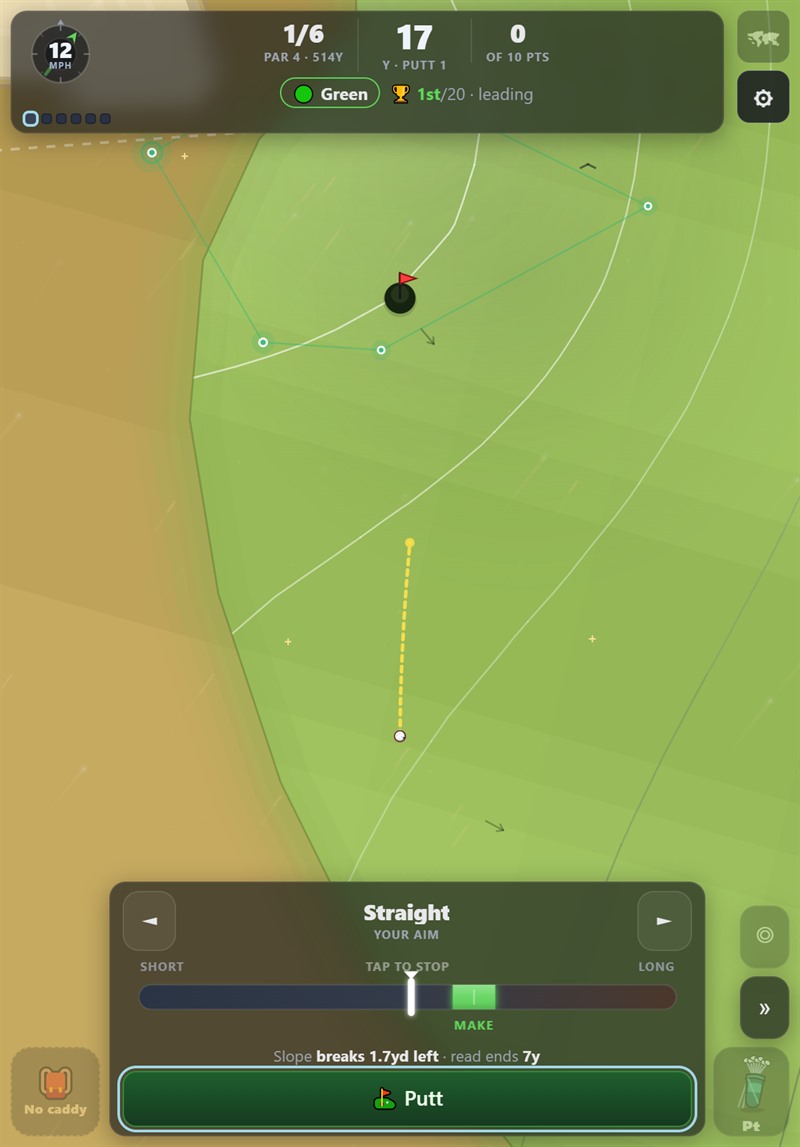
On the green the panel shows three things: the read, the aim nudges and the pace meter.
- The read tells you what the slope does — flat, breaks 2y right, or double-breaks when the line S-curves and the net break lies about it.
- ◄ and ► nudge your aim across the break. You are aiming to cancel it, so a putt that breaks right gets aimed left.
- The pace meter sweeps back and forth. Tap to stop it where you want the weight, then commit with ⛳ Putt.
The contours, shading and arrows drawn on the green are the slope the ball will roll on, so you can read a putt from the picture.
If the nudges are greyed out, a caddy or a putter with a green read has already picked the line for you. Their name is on the row.
One caddy — Penelope Putter — takes the meter off you entirely and putts automatically. She is the only way to skip this.
Part two — playing a run
06 The game modes
If you are new, start with Story Tour. It is the campaign, it introduces things as you go, and it has an ending.
🌠 Story Tour
A campaign across the galaxy, chapter by chapter. Each one builds to a Galaxy Tournament in a different format — scramble, best-ball, singles matchplay, strokeplay, a 2v2 — with qualifying events on the road between them, and partners you choose.
One campaign per golfer, so all four can have one going at once. Starting a golfer's campaign over is the only thing that can overwrite one, and the game asks first.
🚀 The Voyage
The winnable roguelike run: three arcs, three bosses, one win. Survive the cut at every stop. Short, tense, and the best place to learn what gear does.
🌌 Unending Universe
Endless. The allowance tightens forever, so it always ends — the question is how far out you got. This is the leaderboard chase.
🗺 Star Tour
Unlocked by finishing a Story Tour campaign. Free-roam the whole star chart, land on any world, play its designed 18, and chase a record per course.
Two more tiles, The Destination and Universe Unending, are locked. They are not in the game yet.
Starting, stopping and coming back
You can have one run parked per mode, per golfer — a Voyage with Larry and an Unending with Bo do not touch each other — and the title screen's Continue card picks up the last thing you played.
There are two ways out of a round, and they are in ⚙ Settings:
Parks it. You come back on the hole you were on, in every mode. Nothing is lost.
Throws it away, on purpose, and the wording tells you what that costs before you tap it. A Story world round hands you back to your campaign with everything it has earned intact; a Star Tour round posts no record; a Voyage or Unending run ends and pays out nothing.
Both ask before they act, and neither can touch a run parked in another mode.
07 How scoring works
The headline number is Stableford points, not strokes. Points suit a game where one hole can go very wrong: a disaster hole scores zero and stops there, rather than wrecking the whole run.
| Your hole | Points |
|---|---|
| Albatross (3 under) | 5 |
| Eagle (2 under) | 4 |
| Birdie (1 under) | 3 |
| Par | 2 |
| Bogey (1 over) | 1 |
| Double bogey or worse | 0 |
In other words: par plus two, minus what you took. It cannot go below zero.
The cut
In the Voyage you are playing inside a field — a whole tour of other golfers playing the same stop. Every stop has a cut, and what matters is your position: survive it and you travel on, miss it and the tour is over. The field thins as you go, gently at first, until only two of you are left for the final.
Bosses are different. Each arc ends in a matchplay knockout against a rival paired to your rank, and you win it hole by hole.
Endless survival
The Unending Universe measures a set of four holes at a time. Your strokes over par across the set have to come in under an allowance, and the allowance tightens every two sets. It resets each set, so one blow-up hole never ends the run on its own. The only score that is ranked is how deep you got.
08 Between holes
The Pro Shop — credits
Credits are earned by scoring and spent between stops. They last one run and go with it when it ends, so there is no reason to hoard them. The rack rotates each stop and gets richer the deeper you travel: clubs, shafts, putters, relics, and the occasional caddy.
Stackable items cost more the more of them you own. You can only keep one caddy — hiring a second one fires the first, and they will not work for you again this run.
The route, and fuel
Travel is a star map with lanes to three destinations. Each carries a different world, a different weather effect and a different event: a long jump into a storm, say, or a short hop past a trade tent.
- Every jump burns fuel, by distance, plus or minus whatever the sky is doing to you. A tailwind is cheaper.
- Short of fuel? You buy the shortfall at the local price, which varies a lot from world to world.
- A sector scan redraws the three lanes if you do not like any of them — but it costs more each time you use it.
- Run dry with nothing affordable and you are stranded, and the run ends there. Keep an eye on the gauge before you commit to a long jump.
The StarMart
A trader's pop-up that turns up mid-course. It sells premium gear only — rare, epic and legendary, no filler — and it takes Star Shards rather than credits. Everything it sells lasts the rest of the run.
09 Your golfer
Each golfer has a shot shape they can't shake, and the run plays differently around it.

A controlled fade on everything, with tidy dispersion. The easiest to aim, and the one to learn on.
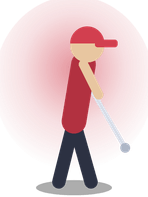
Superb with the irons; the driver and woods fight a snap-hook left. Rewards clubbing down.
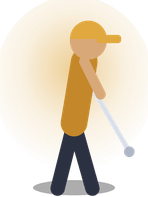
Enormous off the tee, wild with it. Reaches par 5s nobody else can, from places nobody wants.

Short irons that check and hold. Attacks pins other golfers have to play away from.
Tap a golfer's portrait — the picture, not the card — on the select screen and you get their story: where they are from, their best win, their lowest moment. It is optional and there is a fair bit of it.
You also pick two things alongside the golfer: your Ascension level (see below) and which club set you start with, up to the best rarity you have unlocked.
10 Caddies
A caddy is the single biggest thing you can change about a run. You carry one, they are all legendary, and each one folds a different rule into your golf:
- Suggestible Sam — reads the green depth and the carry, and stars a club in the bag.
- Dr Chipinski — holes out from off the green, sometimes, when you least deserve it.
- The Mystic Mole — finds the line on a putt nobody else can see, and takes the aim off you.
- Sandy Sandsaver — gets you home from the beach.
- Penelope Putter — putts for you, automatically.
- The Prognostic Parrot — sees the future: your shot is drawn twice and you keep the better one.
- Driver Dan and others — each with their own trick, and their own faction.
Their permanent slot is bottom-left of the play screen. When the portrait is dimmed the caddy is still on your bag; they just have no read on this shot.
Hiring fires. Taking on a new caddy sacks the one you have, and they will not work for you again for the rest of the run. The game warns you before it happens.
11 What you keep
Credits are gone when a run ends. Star Shards and Ascension progress stay with you.
✦ Star Shards
Earned across every run, spent in the Trade Market on eighteen ships and forty-plus cosmetics, and equipped per golfer in the Clubhouse. Buying is global; wearing is per character, so each of your four can look completely different.
Some things cannot be bought at all. A hole-in-one in any mode earns a ship that is not for sale, and finishing a campaign hangs a set of gear you can only get one way.
⬆ Ascension
A difficulty ladder you choose when you pick your golfer. Clearing a gate unlocks a permanent bag tier — a better starting club set for every future run — plus one random club for that character. It goes up to 15.
Higher Ascension tightens the early cuts and sharpens the bosses. Lower Ascension hands the whole field an easing, so a modest bag at even par is genuinely competitive; that easing fades out entirely by the eighth gate.
Part three — your game
12 Settings
The ⚙ is on every screen, including mid-shot. Everything below can be changed at any time and takes effect immediately.
Skips the tap after each shot and rolls straight on.
Mirrors the controls and the whole cast, so a left-handed golfer plays a left-handed game.
A clearer typeface with roomier letter and word spacing, no italics and no justification.
Scales the buttons with the text, so targets stay easy to hit.
Calmer effects and celebrations. It starts from your system preference and is yours to override in either direction.
Sets how every shot is pre-aimed. The same three you can cycle mid-round with the ◎ button.
All synthesized in the browser — nothing is downloaded. Music is a different piece of ambience per world.
Export, import, and how your browser is treating your save. More below.
13 Save data
Your progress is saved automatically on your own device. There is no account and nothing in the cloud, so nobody can restore it for you.
Export a backup. ⚙ Settings → Save data → Export writes one file holding every campaign, your current run and your settings. Import brings it all back, on any device, in any browser. Do it after any run you would hate to lose.
- Clearing your browser's site data erases the save. So do some "clean up storage" tools, and so does a private/incognito window that never persisted it in the first place.
- Each place you play keeps its own save. Playing on itch.io, playing at farcarry.vulpecula.games, and the installed app are three separate spaces that cannot see each other. The export file is the bridge.
- If the game cannot read a save it will not overwrite it. It goes read-only, tells you on the title screen, and lets you download the raw bytes — a save it does not understand is never quietly replaced with an empty one.
- The game will nudge you when it has been a good few runs since your last export. It counts runs, not days, and it goes quiet the moment you actually export.
If something has gone wrong with a save, write to support@vulpecula.games.
14 Install it as an app
There is nothing to download and nothing to update, but you can install it properly on your home screen. Installed, it runs with no connection at all.
Open farcarry.vulpecula.games and:
In Chrome, let the page finish loading, then open the ⋮ menu and pick whichever option says Install. Depending on your version that reads Install app, Add to Home screen or Install and create shortcut — they all give you the real app. One that only says Create shortcut is a bookmark, not an app.
Open it in Safari, then Share → Add to Home Screen. It has to be Safari; on iOS every other browser gives you a bookmark instead.
Chrome and Edge show an install icon in the address bar. Most other browsers can do it too, under Install or Add to Home screen in the main menu.
Installed properly, the game opens with no address bar. If you can still see one you got a bookmark. Remove it, reload the page once, and try again.
You cannot install it from inside the itch.io player — installation needs the game to be the whole page, which is what the address above is for. And remember that the installed app keeps its own save: export from the browser first, import into the app after.
15 If something's wrong
The interface feels cramped
Turn the text size up rather than squinting: at larger sizes the play screen deliberately shows fewer things at the same size rather than shrinking anything. The hole's shape and width descriptors move to the tee card, where they were always fixed for the hole anyway.
I'm getting an old version
The game caches itself so it can run offline, and once in a while a browser will hold on to the previous build for a launch. Reload the page and it will pick the new one up. The build number is on the title screen if you want to check.
The title screen says it can't save
Something is blocking site storage — usually a private/incognito window, or a strict "block all cookies" setting. The game is still fully playable; it just will not persist. It tells you on the title screen rather than letting you find out at the end of a campaign.
The putt aim arrows do nothing
A caddy or a putter with a green read on it has already found the line, so there is nothing left for you to nudge. The row names whoever did it.
I've found a bug
The whole simulation is deterministic from a seed, so a seed plus the build number reproduces a bug exactly — that is worth more than a screenshot. Both are visible in the game.
Send it to support@vulpecula.games, or leave it in the comments on the itch.io page — whichever suits you.